Microsoft 365 · DKIM · GoDaddy DNS
Turn on DKIM for Microsoft 365 — when your DNS is on GoDaddy
Your mail is being signed; it is being signed as Microsoft, not as you. Until DKIM is switched on for your custom domain, that is the only signature you will ever get — and it can never align with your From address.
The fast answer
- Microsoft Defender portal (
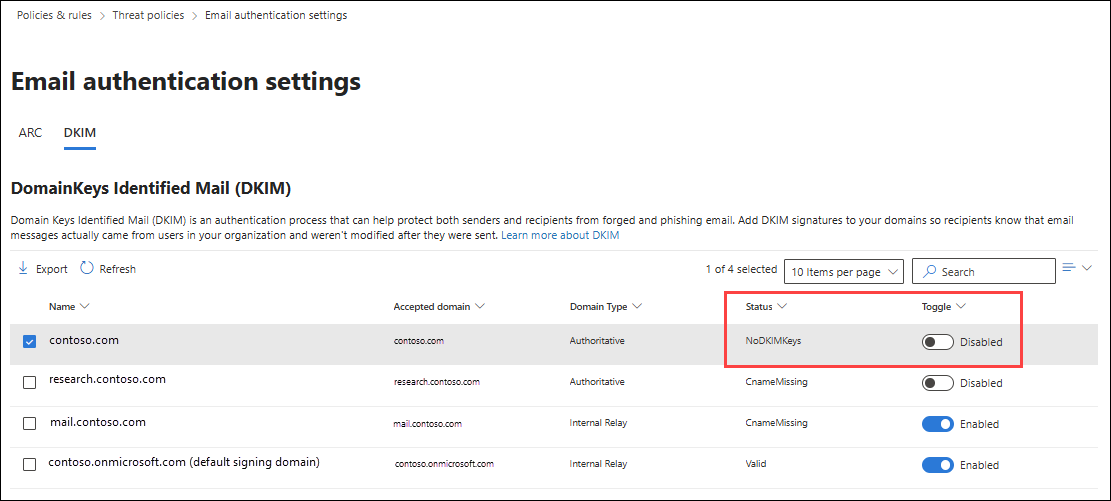
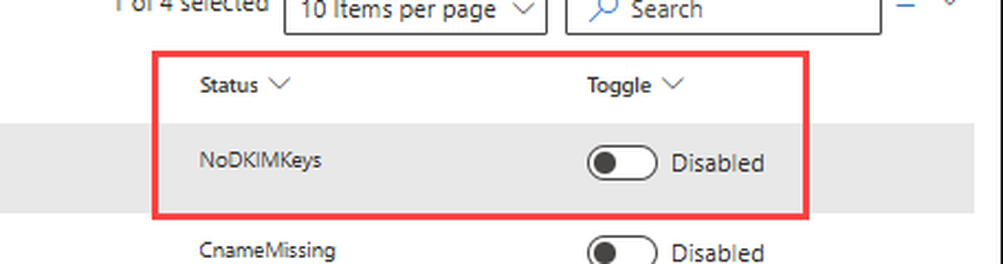
security.microsoft.com) → Email & collaboration → Policies & rules → Threat policies → Email authentication settings → DKIM tab. - Select your domain, slide the toggle to Enabled. A “Client error” dialog appears — expected. It means the CNAMEs don't exist yet; click OK. Status: CnameMissing.
- Open the domain's details flyout → Publish CNAMEs → copy your tenant's two values. No other source on Earth has them.
- GoDaddy: create both CNAMEs (fields in the table below; TTL 1 Hour; no trailing dot).
- Back in the flyout, switch on “Sign messages for this domain with DKIM signatures.”
Which Microsoft 365 do you have? It changes the first move
| Your arrangement | Your path |
|---|---|
| Bought Microsoft 365 from Microsoft, domain/DNS at GoDaddy | Either the manual ladder below, or Microsoft's automated Domain Connect route: in the Microsoft 365 admin center's domain setup, choose Add DNS records → GoDaddy → Authorize, and under Advanced options the wizard names DKIM as a selectable service. Finish by confirming signing is ON in the Defender portal (Step 5) — that status is the completion test either way. |
| Microsoft 365 from GoDaddy (resold) | The Defender portal flow below is your path — GoDaddy's own documentation walks its resold customers through it. One sign-in trap GoDaddy itself warns about: your GoDaddy username and password do not sign you into the Defender portal; use your Microsoft 365 admin credentials. |
The GoDaddy CNAMEs — fields, exactly
| GoDaddy field | Record 1 | Record 2 |
|---|---|---|
| Type | CNAME | CNAME |
| Name (Host) | selector1._domainkey | selector2._domainkey |
| Value (Points to) | The exact target shown in YOUR portal's Publish CNAMEs flyout. Since May 2025, new domains get targets shaped like selector1-yourdomain-com._domainkey.<tenant>.<partition>-v1.dkim.mail.microsoft — the partition character is assigned by Microsoft and cannot be guessed, templated, or borrowed. | |
| TTL | 1 Hour (3600) — GoDaddy's default, and exactly Microsoft's documented minimum. | |
| Trailing dot | None. Microsoft's registrar table is explicit for GoDaddy: no trailing dot, and GoDaddy appends your domain to names automatically. | |
Prove it worked
- Defender portal: the domain's status shows DKIM enabled/signing, no longer CnameMissing. New CNAMEs can take time to be seen — Microsoft's documented ceiling is up to 48 hours; most resolve far sooner, and the correct response to a correct record is waiting, not re-typing.
- A real message: send mail to an outside address, open it there, and read the headers (Microsoft's free Message Header Analyzer, mha.azurewebsites.net, lays them out readably). You want
dkim=passwithheader.d= your domain — the moment the signature starts naming you, alignment becomes possible and DMARC can pass on the DKIM leg. - Companion check: while you are here, confirm SPF names Microsoft correctly for your arrangement — direct tenants:
include:spf.protection.outlook.com; Microsoft 365 from GoDaddy tenants: GoDaddy documentsinclude:secureserver.net(auto-added). Each side's official page is a trap for the other's customers; use the one that matches how you bought the product.
Still CnameMissing? In order
- Values copied from anywhere except your flyout — screenshots, older guides, a colleague's tenant. The May 2025 format change made even good old screenshots structurally wrong. Re-copy from Publish CNAMEs.
- A TXT record sits where the CNAME belongs. Remove it; create the CNAME.
- Name doubled. GoDaddy appends your domain; a fully-typed name becomes
selector1._domainkey.yourdomain.yourdomain. Read the record back. - Impatience. Inside Microsoft's documented window, CnameMissing is a clock, not a verdict.
- Wrong tenant signed in. The flyout you copied from belongs to a different Microsoft 365 organisation than the one sending your mail (a live risk for anyone who also administers a GoDaddy-resold tenant).
FAQ — the issues behind this problem
Microsoft signed my mail already — why do I need this?
The onmicrosoft.com signature proves the mail came from Microsoft's platform, not from your domain. DMARC alignment compares the signature's domain to your From domain; a Microsoft signature can never match, so without custom-domain DKIM your DMARC rests entirely on SPF — one forwarding hop away from failing.
Records provably right, portal still stuck past the window. Microsoft's validation can cache an earlier failed lookup and refuse to re-check — a known pattern in Microsoft's own Q&A. The nudge that forces a fresh lookup is an off/on cycle in Exchange Online PowerShell: Set-DkimSigningConfig -Identity yourdomain -Enabled $false, wait about five minutes, then the same command with $true. Read the state any time with Get-DkimSigningConfig -Identity yourdomain — you want Enabled: True, Status: Valid. Use this only when an outside DNS checker already sees both CNAMEs exactly right; toggling cannot fix a wrong record.
Create both records, even though only one signs today. Microsoft's troubleshooter is explicit: selector2 is the rotation seat. With only selector1 published, signing can switch on — and then key rotation fails later, with the portal warning about an incomplete configuration. Both CNAMEs now is what makes rotation a non-event forever.
Do I need to rotate these keys?
Microsoft supports DKIM key rotation and recommends it as hygiene; the two selectors exist so rotation never interrupts signing. It is maintenance for later — today's job is getting signing on at all.
My portal shows a bit-length choice nowhere. What size are my keys?
Honest answer: Microsoft's documentation does not state the portal-generated key size (its cmdlet documentation mentions a 1024-bit default; third-party claims of 2048 are not Microsoft-documented). What matters for delivery is that the CNAMEs resolve and signing is on — both verifiable above.
Sources
Microsoft Learn — How to use DKIM for email in your custom domain, the DKIM troubleshooter, Domain Connect setup documentation, and Learn's registrar-requirements table (GoDaddy: trailing dot No; TTL floor 3600) · GoDaddy Help — CNAME records; article 41748 (Defender-portal flow for Microsoft 365 from GoDaddy) · Live DNS check for this guide: legacy-format selectors still answering on established tenants, October 2026.
Did this fix work for you?
Your reaction tells us whether this guide solved the problem it promised to solve.